Notes of Database
What is Data?
Data is a collection of facts, such as values or measurements. It can be numbers, words, measurements, observations or even just descriptions of things.
There are two type of data.
Qualitative and Quantitative
Qualitative data is descriptive information (it describes something)
Quantitative data, is numerical information (numbers).
And Quantitative data can also be Discrete or Continuous:
Discrete data can only take certain values (like whole numbers)
Continuous data can take any value (within a range)
For example if we have a dog then:
Qualitative:
He is brown and black
He has long hair
He has lots of energy
Quantitative:
Discrete:
He has 4 legs
He has 2 brothers
Continuous:
He weighs 25.5 kg
He is 565 mm tall
What is Information?
Data is the collection of raw facts collected from any specific environment for a specific purpose. Data in itself does not show anything about its environment, so to get desired types of results from the data we transform it into information by applying certain processing on it. Once we have processed data using different methods data is converted into meaningful form and that form of the Data is called information.
If we consider the the following example of data:
Emply name , age , salary
We figure without the titles or the labels associated with the data ( EmpName, age, salary) then it is not much useful. However, after attaching these labels for example company name .department name it brings some meanings to us. So this is a very simple example of processing that we can do on the data to make it information.
Some important point in information
✔ Information is the outcome derived after processing the data.
✔ Information is always meaningful.
✔ Output after processing the system is Information.
✔ Understanding is easy.
✔ Information is already in understandable form, it may be processed further to make it more understandable.
✔ Information should be in the order.
✔ Example Reports, Knowledge.
Metadata
Metadata describes other data. It provides information about a certain item's content. For example, an image may include metadata that describes how large the picture is, the color depth, the image resolution, when the image was created, and other data. A text document's metadata may contain information about how long the document is, who the author is, when the document was written, and a short summary of the document.
Web pages often include metadata in the form of meta tags. Description and keywords meta tags are commonly used to describe the Web page's content. Most search engines use this data when adding pages to their search index.
Some of the more popular examples of DBMS solutions include Microsoft Access, FileMaker, DB2, and Oracle. All these products provide for the creation of a series of rights or privileges that can be associated with a specific user.
What Is Database?
A Database is a collection of information that is organized so that it can easily be accessed, managed, and updated.
Fields, records, and files organize traditional databases. A field is a single piece of information; a record is one complete set of fields; and a file is a collection of records. For example, a telephone book is analogous to a file. It contains a list of records, each of which consists of three fields: name, address, and telephone number.
An alternative concept in database design is known as Hypertext. In a Hypertext database, any object, whether it be a piece of text, a picture, or a film, can be linked to any other object. Hypertext databases are particularly useful for organizing large amounts of disparate information, but they are not designed for numerical analysis.
We also define database in these words that
Database is collection of data that is used or shared by the multiple user for variety of task ?.
The modern definition of database is ?Database is a shared and integrated collection of interrelated data. The main objective of database is organized the data in such way so as it minimize the redundancy (if similar data is stored on different places then it is called redundancy) and maximize the access.
Database has two properties.
It is integrated
It is shared
Components of Database Environment
The major components of database environment are:
1) User Group
2) Database Management System
3) Application Programmer
4) Database Administrator
5) Data Dictionary
User Group:
This is also called end user. End user are actually the most important people involved with a data base management system. There are three basic categories of end user requests:
Read Only
Add/Delete
Modify.
All user requests for data are made through DBMS.
Database Management System:
A DBMS is a collection of pre-written integrated program. Its major function is the interfacing by physical database and user of the system. The term DBMS is a software or set of program allowing the user to access database in a logically way.
We also say that
To access information from a database, you need a database management system (DBMS). This is a collection of programs that enables you to enter, organize, and select data in a database?.
Data Dictionary:
In database management systems, a file that defines the basic organization of a database. A data dictionary contains a list of all files in the database, the number of records in each file, and the names and types of each field. Most database management systems keep the data dictionary hidden from users to prevent them from accidentally destroying its contents.
Data dictionaries do not contain any actual data from the database, only bookkeeping information for managing it. Without a data dictionary, however, a database management system cannot access data from the database.
Application Programmer:
Application programmer is responsible to develop the application program for the organization, which achieves the various need of an organization.
Database Administrator(DBA):
DBA is a person who is managing information of organization. The DBA is responsible for planning of the organization. He also must have the knowledge if the direction of data processing.
Responsibility of Database Administrator (DBA)
The DBA is a person or group of person responsible for over all control of the database or managing the information of the organization.
A database administrator (DBA) is responsible for the performance, integrity and security of a database. Additional role requirements are likely to include planning, development and troubleshooting.
The DBA design the schema or Model, which is the complete description of the contents of and structure of the Database. DBA can play important role in the collection of data processing and also play both technical and administrative role in the information of organization.
DBA is also responsible for the accuracy and security of the data stored in the database. DBA have following responsibilities:
1-Overall design and coordination
2-Development of schema and sub schema
3-Development of the data dictionary
4- Logical and Physical layout of data of the organization.
5- System and user documentation
6- Training and education of end user
7- Control over all operation perform on database
8- Testing and maintaining of database.
9- Establishing the emergency procedure in case of system failure.
10- Commissioning and installing new applications.
11- Ensuring that storage, archiving, backup and recovery procedures are functioning correctly;
Data Management
Making data resources of an organization is called data management. Its main purpose is as follows:
Data collection
Data organization
Data storage
Data retrieval
Data manipulation
Data analyses
There are two approaches to wards data management
1) Traditional approach / classical approach
2) Database approach
1.Traditional approach:
This approach is early days approach of data processing. Same data is stored at different places to meet the needs of particular objective. In this approach each program has its own set of data files for the processing of the data. If we need of new application program then existing files would have to be restricted.
2. Database approach:
This approach refers to database management system. As in DBMS approach we reduced the redundancy. Its means there is no duplication of records.
In database approach multiple user can access the file available in database. The data, which is stored in database, is independent of the application program. In database system multiple user can access and store the information in central location.
Disadvantage of Traditional Approach
The traditional approach has following disadvantages.
1. Uncontrolled Redundancy:
In this system every application program have its own data file. So data redundancy occur means same data is stored in different places.
2. Inconsistent data:
In this approach same data is stored in different places so if we want to change any record in one file then we have to change all he files other wise information will be mismatch.
3. Inflexibility:
In this system each application program generates different outputs however such system is often quite flexible and not easy to change the output of result.
4.Limited Data Sharing:
In this approach each application has its own private file and limited sharing. Other application cannot use these files.
5.Low Program Productivity:
In this system programmers must design each record and files used for an application and will also select the file access method and write the procedure of input output statement. This will consume a lot of time to develop data files and will cause increase the cost of software.
6.Excessive Program maintenance:
In this system description of files, record and data item is embedded with individual program. There for any modification in data file such as data name format or method of access requires the program should be modified.
Advantages of Data Base Approach
The following are the advantages of the database approach over the classical / traditional system.
1) Reduction of Redundancy.
2) Consistency of data.
3) Integration of data.
4) Data sharing.
5) Reduction program maintenance.
6) Data Security
7) Resource utilization.
8) Data independence.
1.Reduction of redundancy:
As in database approach each data item is recorded in only one place. So in this case redundancy will be minimum. But we cannot say that in database approach redundancy is completely eliminated because multiple copies of same data are required to store to separately. However it can be controlled.
2.Consistency of data:
As in the database approach the data is stored centralized. Therefore the entire user can access or use the same data.
3.Integration of data:
The database approach also provides data integrity, which means that data is stored also in single logical structure. Therefore, the logical relationship mean user easily access and relate one data item to another.
4.Data Sharing:
As in database approach all the data is stored centralized. Then it is not the property of single user. Hence each user can access data according to there?s own view. This required data can be accessed or shared by means of query language.
5.Reduction program Maintenance:
In DBMS system database is in depended of the application program so if we change the database then there is no changing require in application program. And all the input and output function, files type and data field s already defined by the DBMMS so less time requires developing the application program.
6.Data Security:
In this system database administrator is responsible for database security. When aver sensitive data can be accessed then the database approach completely provides the authority over the database administration.
Disadvantages OD Database
Database systems are complex, difficult, and time-consuming to design
Substantial hardware and software start-up costs
Damage to database affects virtually all applications programs
Extensive conversion costs in moving form a file-based system to a database system
Initial training required for all programmers and users.
What is DBMS
A database management system (DBMS), sometimes just called a database manager, is a program that lets one or more computer users create and access data in a database. The DBMS manages user requests (and requests from other programs) so that users and other programs are free from having to understand where the data is physically located on storage media and, in a multi-user system, who else may also be accessing the data. In handling user requests, the DBMS ensures the integrity of the data (that is, making sure it continues to be accessible and is consistently organized as intended) and security (making sure only those with access privileges can access the data). The most typical DBMS is a relational database management system (RDBMS). A standard user and program interface is the Structured Query Language (SQL). A newer kind of DBMS is the object-oriented database management system (ODBMS).
Function of Database
There are several functions that a DBMS performs to ensure data integrity and consistency of data in the database. The ten functions in the DBMS are:
Data Dictionary Management
Data Dictionary is where the DBMS stores definitions of the data elements and their relationships (metadata). The DBMS uses this function to look up the required data component structures and relationships. When programs access data in a database they are basically going through the DBMS.
Data Storage Management
This particular function is used for the storage of data and any related data entry forms or screen definitions, report definitions, data validation rules, procedural code, and structures that can handle video and picture formats. Users do not need to know how data is stored or manipulated
Data Transformation and Presentation
This function exists to transform any data entered into required data structures. By using the data transformation and presentation function the DBMS can determine the difference between logical and physical data formats.
Security Management
This is one of the most important functions in the DBMS. Security management sets rules that determine specific users that are allowed to access the database. Users are given a username and password or sometimes through biometric authentication (such as a fingerprint or retina scan) but these types of authentication tend to be more costly.
Multi-user Access Control
Data integrity and data consistency are the basis of this function. Multi-user access control is a very useful tool in a DBMS, it enables multiple users to access the database simultaneously without affecting the integrity of the database.
Backup and Recovery Management
Backup and recovery is brought to mind whenever there is potential outside threats to a database. For example if there is a power outage, recovery management is how long it takes to recover the database after the outage. Backup management refers to the data safety and integrity; for example backing up all your mp3 files on a disk.
Data Integrity Management
The DBMS enforces these rules to reduce things such as data redundancy, which is when data is stored in more than one place unnecessarily, and maximizing data consistency, making sure database is returning correct/same answer each time for same question asked.
Database Access Languages and Application Programming Interfaces
A query language is a nonprocedural language. An example of this is SQL (structured query language). SQL is the most common query language supported by the majority of DBMS vendors. The use of this language makes it easy for user to specify what they want done without the headache of explaining how to specifically do it.
Database Communication Interfaces
This refers to how a DBMS can accept different end user requests through different network environments. An example of this can be easily related to the internet. A DBMS can provide access to the database using the Internet through Web Browsers (Mozilla Firefox, Internet Explorer, Netscape).
Transaction Management
This refers to how a DBMS must supply a method that will guarantee that all the updates in a given transaction are made or not made. All transactions must follow what is called the ACID properties.
What is Schema?
In a relational database, the schema defines the tables, the fields in each table, and the relationships between fields and tables.
Schemas are generally stored in a data dictionary. Although a schema is defined in text database language, the term is often used to refer to a graphical depiction of the database structure.
Types Of Database
1) Distributed Database:
A database that consists of two or more data files located at different sites on a computer network. Because the database is distributed, different users can access it without interfering with one another. However, the DBMS must periodically synchronize the scattered databases to make sure that they all have consistent data.
To ensure that the distributive databases are up to date and current, there are two processes: replication and duplication. Replication involves using specialized software that involves looking for changes in the distributive database. Once the changes have been identified, the replication process makes all the databases look the same. The replication process can be very complex and time-consuming depending on the size and number of the distributive databases. This process can also require a lot of time and computer resources. Duplication on the other hand is not as complicated. It basically identifies one database as a master and then duplicates that database. The duplication process is normally done at a set time after hours. This is to ensure that each distributed location has the same data. During the duplication process, changes to the master database only are allowed. This is to ensure that local data will not be overwritten. Both of the processes can keep the data current in all distributive locations.
2) Centralized database: -
A centralized database has all its data on one
place. As it is totally different from distributed database which has data on
different places. In centralized database as all the data reside on one place so
problem of bottleneck can occur, and data availability is not efficient as in
distributed database. Let me define some advantages of distributed database, it
will clear the difference between centralized and distributed database.
Difference Between Distributed and Centralized Database
The main difference between centralized & distributed databases is that the distributed databases are typically geographically separated, are separately administered, & have slower interconnection. Also in distributed databases we differentiate between local & global transactions. A local transaction is one that accesses data only from sites where the transaction originated. A global transaction, on the other hand, is one that either accesses data in a site different from the one at which the transaction was initiated, or accessed data in several different sites.
Advantages of distributed databases
1. Local autonomy ? a department can control the data about them (as they are the ones familiar with it.)
2. Protection of valuable data ? if there were ever a disastrous event such as a fire, all of the data would not be in one place, but distributed in multiple locations.
3. Improved performance ? data is located near the site of greatest demand, and the database systems themselves are parallelized, allowing load on the databases to be balanced among servers.
4. Economics ? it costs less to create a network of smaller computers with the power of a single large computer.
5. Modularity ? systems can be modified, added and removed from the distributed database without affecting other modules (systems).
6. Reliable transactions - Due to replication of database single site failure doesn?t affect performance of system..
Disadvantage of Distributed Database:
- Complexity ? extra work must be done by the DBAs to ensure that the distributed nature of the system is transparent. Extra work must also be done to maintain multiple disparate systems, instead of one big one.
- Economics ? increased complexity and a more extensive infrastructure means extra labour costs.
- Security ? remote database fragments must be secured, and they are not centralized so the remote sites must be secured as well. The infrastructure must also be secured (e.g., by encrypting the network links between remote sites).
- Difficult to maintain integrity ? in a distributed database, enforcing integrity over a network may require too much of the network's resources to be feasible.
- Inexperience ? distributed databases are difficult to work with, and as a young field there is not much readily available experience on proper practice.
- Lack of standards ? there are no tools or methodologies yet to help users convert a centralized DBMS into a distributed DBMS.
- Additional software is required.
- Operating System should support distributed environment.
Database Models
A database model or database schema is the structure or format of a database, described in a formal language supported by the database management system. Schemas are generally stored in a data dictionary.
Although a schema is defined in text database language, the term is often used to refer to a graphical depiction of the database structure.
A database model is a theory or specification describing how a database is structured and used. Several such models have been suggested.
1.Hierarchical Model
In a hierarchical model, data is organized into a tree-like structure, implying a single upward link in each record to describe the nesting, and a sort field to keep the records in a particular order in each same-level list. Hierarchical structures were widely used in the early mainframe database management systems, such as the Information Management System (IMS) by IBM, and now describe the structure of XML documents. This structure allows one 1:N relationship between two types of data. This structure is very efficient to describe many relationships in the real world; recipes, table of contents, ordering of paragraphs/verses, any nested and sorted information. However, the hierarchical structure is inefficient for certain database operations when a full path (as opposed to upward link and sort field) is not also included for each record.
2.Network Model
The network model (defined by the CODASYL specification) organizes data using two fundamental constructs, called records and sets. Records contain fields (which may be organized hierarchically, as in the programming language COBOL). Sets (not to be confused with mathematical sets) define one-to-many relationships between records: one owner, many members. A record may be an owner in any number of sets, and a member in any number of sets.
The network model is a variation on the hierarchical model, to the extent that it is built on the concept of multiple branches (lower-level structures) emanating from one or more nodes (higher-level structures), while the model differs from the hierarchical model in that branches can be connected to multiple nodes. The network model is able to represent redundancy in data more efficiently than in the hierarchical model.
3.Relational Model: -
The relational model was introduced by 1970 as a way to make database management systems more independent of any particular application. It is a mathematical model defined in terms of predicate logic and set theory.
The products that are generally referred to as relational databases in fact implement a model that is only an approximation to the mathematical model defined by Cod. Three key terms are used extensively in relational database models: relations, attributes, and domains. A relation is a table with columns and rows. The named columns of the relation are called attributes, and the domain is the set of values the attributes are allowed to take.
The basic data structure of the relational model is the table, where information about a particular entity (say, an employee) is represented in columns and rows (also called tuples). Thus, the "relation" in "relational database" refers to the various tables in the database; a relation is a set of tuples. The columns enumerate the various attributes of the entity (the employee's name, address or phone number, for example), and a row is an actual instance of the entity (a specific employee) that is represented by the relation. As a result, each tuple of the employee table represents various attributes of a single employee.
4.Entity Relational Model
The entity-relationship model (or ER model) is a way of graphically representing the logical relationships of entities (or objects) in order to create a database. The ER model was first proposed by Peter Pin-Shan Chen in the 1970s.In ER modeling, the structure for a database is portrayed as a diagram, called an entity-relationship diagram (or ER diagram), that resembles the graphical breakdown of a sentence into its grammatical parts. Entities are rendered as points, polygons, circles, or ovals. Relationships are portrayed as lines connecting the points, polygons, circles, or ovals. Any ER diagram has an equivalent relational table, and any relational table has an equivalent ER diagram. ER diagramming is an invaluable aid to engineers in the design, optimization, and debugging of database programs.
In a logical sense, entities are the equivalent of grammatical nouns, such as employees, departments, products, or networks. An entity can be defined by means of its properties, called attributes. Relationships are the equivalent of verbs or associations, such as the act of purchasing, the act of repairing, being a member of a group, or being a supervisor of a department. A relationship can be defined according to the number of entities associated with it, known as the degree.
There are three basic elements in ER models:
Entities are the "things" about which we seek information.
Attributes are the data we collect about the entities.
Relationships provide the structure needed to draw information from multiple entities.
Concept of Key In Relational Database
A key is single attribute that is used to identify one or more item form database. In simple word we say that data item which is used to identify the record is called key. The data elements, which cause other element to be known, is called key.
For example
Rno name City
001 Toqeer DIKHAN
002 Abrar DIKHAN
003 Ali DIKHAN
In above table RNO is a data element by which we can identify the record so it is called key.
TYPES OF KEY
1. Primary Key:
A data item or attribute that uniquely identify every tuple (row or record) in relation is called primary key or attribute key. It is used to access the data from database. It is also called atomic key (It is probably meant to identify something "as small as possible"). A table must have unique key so that no duplication occurs. Primary key always unique and not assign NULL value.
For example
Reg# Name City
In above relation Reg # is primary key because as no more then one student have same Reg # so we can access single row with the help of Reg#. In simple word if we give Reg # of the student then we can access the whole record of that student.
2. Secondary Key:
A candidate key, which is not selected as a primary key is called secondary key.
In department teacher record group of data item identify by data item professor while another group of record may be identified with the data item lecturer.
3. Compound Key:
In database design, a compound key is a key that consists of 2 or more attributes that uniquely identify an entity occurrence. Each attribute that makes up the compound key is a simple key in its own right.
4. Composite Key:
Composite key is also a key that consists of 2 or more attributes that uniquely identify an entity occurrence; at least one attribute that makes up the composite key is not a simple key in its own right.
5. Super Key
A super key is a set of columns within a table whose values can be used to uniquely identify a row. A candidate key is a minimal set of columns necessary to identify a row, this is also called a minimal super key. For example, given an employee table, consisting of the columns employeeID, name, job, and departmentID, we could use the employeeID in combination with any or all other columns of this table to uniquely identify a row in the table. Examples of superkeys in this table would be {employeeID, Name}, {employeeID, Name, job}, and {employeeID, Name, job, departmentID}.
In a real database we don't need values for all of those columns to identify a row. We only need, per our example, the set {employeeID}. This is a minimal superkey ? that is, a minimal set of columns that can be used to identify a single row. So, employeeID is a candidate key
6. Candidate key:
When more then one attribute can access the uniquely record from a table then one attribute chosen as primary key then other attribute is candidate key.
7. Foreign Key:
An attribute which is primary key in one relation and non primary key in other relation then it is called foreign key.
For example if we have two relation
Student(Rno#, Name, Marks)
Book(Rno#, Book#, Bname)
In student record Rno# is used as primary key and in book record of library one Rno# can take more then one books so in this relation we can not used Rno# as primary key. So in this relation Book# is used as primary key. So Rno# in Book relation is used as Foreign Key.
Association Between Data Items
An association is logical relationship between data items. An association implies that the values for the associated data item are in same way depending on each other.
There are following four types of association:
1. One To One Association
2. One To Many Associations
3. Conditional Association
4. Reverse Association
i. One To One Association
ii. One To Many Associations
iii. Many To Many Associations
1) One To One Association:
A One To One association between data item X and Y means that for specified period of time a given value of X have one and only one value for Y. this association is represented as follow.
Suppose we have two data item Reg # and student name then there is one to one association between Reg # and student name because for specified period of time one registration number is assigned to one student.
2) One To Many Associations
A One To many association between data item X and Y means that for specified period of time a given value of X have one or more then one value for Y. this association is represented as follow.
Suppose we have two data item Teacher and Subject then there is one to many association between Teacher and Subject because for specified period of time one teacher may be teach more the one subject.
3) Conditional Association:
Conditional association between data item X and Y mean that there are only two possibilities X have zero or one value for Y. this association is represented as follow.
The most useful example of conditional association is hospital bad and patient. Each bed is associated with one patient or some time it will be unassigned (there will be no patient)
4. Reverse Association
a) One To One Association:
A One To One reverse association between data item X and Y means that for specified period of time a given value of X have one and only one value for Y and y have also one value for X. This association is represented as follow.
Suppose we have two data item Reg # and student Rno then there is one to one reverse association between Reg # and student Rno# because for specified period of time for one Rno# there is only one registration number and for one reg# there is only one Rno #.
b) One to many Associations:
A One To Many reverse association between data item X and Y means that for specified period of time a given value of X have more then one value for Y but y have only one value for X. This association is represented as follow.
Department and teachers have one to many associations in reverse. Because in one department there are many teachers but one teacher can only teach in one department.
Many To Many Association:
A Many To Many association between data item X and Y means that for specified period of time a given value of X have more then one value for Y and Y have also more then one value for X. This association is represented as follow.
The most useful example of this association is relation between Student # and course #. Any student may have taken one or more then one course at a time and any course may have taken by one or more then one students.
Normalization
In the field of relational database design, normalization is a systematic way of ensuring that a database structure is suitable for general-purpose querying and free of certain undesirable characteristics?insertion, update, and deletion anomalies?that could lead to a loss of data integrity.
Normalization is a design technique that is widely used as a guide in designing relational databases. Normalization is essentially a two-step process that puts data into tabular form by removing repeating groups and then removes duplicated data from the relational tables.
The goal of normalization is to create a set of relational tables that are free of redundant data and that can be consistently and correctly modified.
Simply stated, normalization is the process of removing redundant data from relational tables by decomposing (splitting) a relational table into smaller tables by projection.
Steps in Normalization:
There are four steps involve in normalization which are diagrammatically shown below.
1.First Normal Form: -
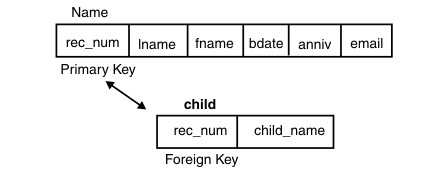
An entity is in the first normal form if it contains no repeating groups. In relational terms, a table is in the first normal form if it contains no repeating columns. Repeating columns make your data less flexible, waste disk space, and make it more difficult to search for data. In the telephone directory example in Figure 19, it appears that the name table contains repeating columns, child1, child2, and child3.

You can see some problems in the current table. The table always reserves space on the disk for three child records, whether the person has children or not. The maximum number of children that you can record is three, but some of your acquaintances might have four or more children. To look for a particular child, you have to search all three columns in every row.
To eliminate the repeating columns and bring the table to the first normal form, separate the table into two tables as Figure 20 shows. Put the repeating columns into one of the tables. The association between the two tables is established with a primary-key and foreign-key combination. Because a child cannot exist without an association in the name table, you can reference the name table with a foreign key, rec_num.
2. Second Normal Form: -
A relational table is in second normal form if it is in 1st normal form (1NF) and every non-key column is fully functionally dependent upon the primary key. Thus no non-key attribute depended on part of the primary key.
That is, every non-key column must be dependent upon the entire primary key.
For example a relation name Supplier contain following fields.
Supplier (S#, P#, S-name, Status, City, Color, Weight, Qty)
Relation Supplier is in 1NF but not in 2NF because status and city are functionally dependent upon only on the column S# of the composite key (S#, P#).
The process for transforming a 1NF table to 2NF is:
1. Identify any determinants other than the composite key, and the columns they determine.
2. Create and name a new table for each determinant and the unique columns it determines.
3. Move the determined columns from the original table to the new table. The determinate becomes the primary key of the new table.
4. Delete the columns you just moved from the original table except for the determinate which will serve as a foreign key.
The original table may be renamed to maintain semantic meaning.
so we see that S-name, City, Status depend on primary key S#. So we make a relation suppiler1 with those fields.
Supplier1 (S#, S-name, City Status)
And Color and weight depend in P#. So we make 2nd relation with name Supplier2 which contain fields P#, Color, Weight)
Supplier 2(P#, Color, Weight)
And Quantity depend on composite key S# and P#. so we create 3rd relation with name supplier3 which contain three field S#, P#, Qty)
Supplier3 (S#, P#, Qty)
?Although Supplier1 (S#, S-name, City, Status) in 2NF but not in 3NF still contain modification anomalies.
INSERT. The fact that a particular city has a certain status cannot be inserted until there is a supplier in the city.
DELETE. Deleting any row in SUPPLIER destroys the status information about the city as well as the association between supplier and city.
3. Third Normal Form : -
The third normal form requires that all columns in a relational table are dependent only upon the primary key. A more formal definition is:
A relational table is in third normal form (3NF) if it is already in 2NF and there is no transitive functional dependency between any two non-key attributes. The entire attribute fully depends on primary key. In other words, all non-key attributes are functionally dependent only upon the primary key.
Table supplier and supplier3 is already in 3NF. The non-key column, qty, is fully dependent upon the primary key (s#, p#). Supplier1 is in 2NF but not in 3NF because it contains a transitive dependency. A transitive dependency is occurs when a non-key column that is a determinant of the primary key is the determinate of other columns. As status depend on city. So we remove the transitive dependencies between city and status.
The process of transforming a table into 3NF is:
1. Identify any determinants, other the primary key, and the columns they determine.
2. Create and name a new table for each determinant and the unique columns it determines.
3. Move the determined columns from the original table to the new table. The determinate becomes the primary key of the new table.
4. Delete the columns you just moved from the original table except for the determinate which will serve as a foreign key.
The original table may be renamed to maintain semantic meaning.
According To above condition following table is not in third normal form such that:
Supplier1 (S#, S-name, City Status)
Filed status fully depended on primary key but also depend on city. So we remove the transitive functional dependency by splitting the table.
So over we have 4 tables now:
Supplier1 (S#, S-name, City)
Supplier2 (City Status)
Supplier 3(P#, Color, Weight)
Supplier4 (S#, P#, Qty)
What you mean by SQL. Define DDL, DML, and DCL?
SQL:
SQL is the abbreviation of Structured Query Language. It is the language of the database. SQL is used to interact with the database. In Structured Query Language, the term Query refers to the request sent to the DBMS for the retrieval of some information from the database. Or, it is a request that asks for some information to be retrieved from the database by means of the DBMS.
When working with the database, you can perform the following operations on any database:
Addition of new empty tables
Insertion of data into tables
Retrieval of data from tables
Updating of existing data into tables
Deletion n of data from tables.
Deletion of tables from the database.
The SQL is further composed of three sub languages.
DDL (Data Definition Language): -
That part of the SQL which deals with the structural changes in the database, including creation, deletion and modification of tables is known as DDL.
Such that CREATE TABLE, ALTER TABLE, DROP TABLE, RENAME etc.
DML (Data Manipulation Language): -
Those statements of the SQL, which handles different transactions on the table, are known as DML
When all these are considered you can perform, all of the above-mentioned operation on the database.
Such that INSERT, UPDATE, DELETE commands.
DCL (Data Control Language)
That part of the database, which deals only with the data dictionary rather than actual data stored by the user. The changes include creation of new users, granting privileges to them, creation of roles, Tuning databases and performing backup and recovery, etc.
GENERAL FORMAT OF SQL COMMAND:
The general syntax of SQL command is
VERB [Parameter 1], [Parameter 2],..........[Parameter]
Where
VERB is the reserve word of Oracle, used to perform a particular operation.
SELECT, FROM, WHERE etc.
PARAMETER these are the values inputted to the VERB on which the operation will be performed. In some command these are optional.
Single colon is used to separate more then parameter from other.
A semi colon indicates the end of SQL sentence.
For Example:
SQL > Select, R no, Name
2. From Stud
3. Where Marks > 520
In above example there are three
VERB SELECT, FROM, WHERE
Parameters are R no, Name, Stud and Marks > 520.
And semi colon (;) Indicate the end of SQL sentence.
What is Create Statement?
To make a new database, table, index, or stored query. A CREATE statement in SQL creates an object inside of a relational database management system (RDBMS). The types of objects that can be created depends on which RDBMS is being used, but most support the creation of tables, indexes, users, and databases.
Create Database Command
The CREATE DATABASE command initializes a new database with an optional user-defined collating sequence, creates the three initial table spaces, creates the system tables, and allocates the recovery log file. When you initialize a new database, the AUTOCONFIGURE command is issued by default.
Syntax:
CREATE DATABASE database_ Name
For Example:
Create database test
Create Table Command
CREATE TABLE will create a new, initially empty table in the current database.
It specify the following information?s
* The name of the table
* The name of each column
* The type of data to be stored in each column
* The width of each column
* Other optional information (data constraints etc)
SYNTAX:
CREATE TABLE [ IF NOT EXISTS ] [ MEMORY ] table_name
( column_definition [, ... ]
index_definition [, ... ] )
Where
|
IF NOT EXISTS |
If this keyword is specified, the table will be created, only if there is no existing table with the same name. If this keyword is not specified and the table already exists, an exception will be raised. |
|
MEMORY |
If MEMORY keyword is specified before the table name then an in-memory table will be created, not a disk one |
|
Table Name |
Refers to the name of the table. |
|
Column definition |
Refers to the name of the column and data type of the column and size of the column |
Example:
1. To create a table named student having columns
Rno Up to 6 digits
Name Up to 30 characters
Address Up to 50 characters
CREATE TABLE student
(Rno Number(6),
Name Char(30))
CREATING TABLE FROM TABLE
When you went to create a new table by using the columns and data type of existing table you can create table command with AS SELECT option.
It is to note that if existing table contain the records then these records will also be copied into new table.
SYNTAX:
CREAT TABLE new table name [column name 1, ......]
AS SELECT colum1, colum2,................
FROM existing table name
WHERE
|
New table |
Will be the name of new table. |
|
Column name1,.. |
The name of the columns if you to change those with existing table. |
|
Column 1,?.. |
The names of column you want to select for new table. |
|
Existing table name |
The name of the table from which you want to create new table. |
EXAMPLE:
1. We want to create a new table named Result from the existing table Student:
CREAT TABLE Result
AS SELECT Rno, Name, Address
FROM student
Insert Into Command
The insert command is used to insert the new record into specified Table.
Then are two ways to insert row in the Table.
The INSERT INTO syntax has 2 main forms and the result of either of them is adding a new row into the database table.
The first syntax form of the INSERT INTO SQL clause doesn't specify the column names where the data will be inserted, but just their values:
Syntax 1:
INSERT INTO Table1
VALUES (value1, value2, value3......)
The second form of the SQL INSERT INTO command, specifies both the columns and the values to be inserted in them:
Syntax 2:
INSERT INTO Table1 (Column1, Column2, Column3,............)
VALUES (Value1, Value2, Value3,................)
Example:
INSERT INTO Student
Values (101,"Tauqeer","DIKHAN
To insert the information in to two filed Rno=102,name=Tanveer we use following command
INSERT INTO Student(Rno,Name)
Values (102,"Tanver")
INSERT DATA FROM TABLE
You can also insert data from a table to another table.
SYNTAX:
INSERT INTO Destination
Table[(CL1,CL2,.................)]
SELECT Column1,Column2,...................
FROM sure table
WHERE
Destination Table The name of the table to which the records will be copied.
CL1,CL2,.... Are the columns names of the destination table.
These are optional.
Colunm1,Column2 Are the names of the columns of source table
Which will be copied to destination table columns.
Source Table The type and width of the source and destination columns must match.
EXAMPLE:
1. You want to copy the record of student to Result Table
SQL > INSERT INTO Result
Select Rno,Name,Address
FROM Student
SELECT COMMAND
The SQL SELECT statement is used to select data from a SQL database table. This is usually the very first SQL command every SQL newly learns and this is because the SELECT SQL statement is one of the most used SQL commands.
Select command is used with FROM keyword. We also use some other clause like that WHERE, HAVING, DISTINCT ORDER BY, which are discuses below.
SYNTAX
SELECT Column1, Column2, Column3,
FROM Table1;
MANY FACES OF SELECT COMMAND
-
Global Data Extract
-
Retrieving Data Of Specified Columns
-
Retrieving Unique Data Of Specified Columns
-
Retrieving Sorted Data
-
Selecting A Set Of Data From The Table
-
Display Computed Results
Global Data Extract
To display the full data of the Table you can use the select command without WHERE clause.
For example
Select * from student;
Where Columns name replace with asterix (*) means all table columns are returned.
Retrieving Data Of Specified Columns
To display the values of the specified columns you can write the name of the columns in the SELECT clause
EXAMPLES
To display the column values of Rno and Name
Select Rno, Name from Student
Retrieving Unique Data Of Specified Columns
To display the Unique values of the specified column use the DISTINCT with the column name. In simple word if a table contain those type of record, which contain same information about any thing, then we use DISTINCT clause, which removed the repeating result in display.
EXAMPLE
To display the unique values of the column Address from Student Table
SELECT DISTINCT (Address)
FROM MFEE
Retrieving Sorted Data from Table
To display the sorted list of the Table on the basis of specified column you can use the ORDER BY clause with the specified column name in FROM clause
EXAMPLE
To display the Sorted rows of the Table Student on the basis of Rno column
SELECT * FROM Student
ORDER BY Rno
Selecting A Set Of Data From The Table
The SQL WHERE clause is used to select data conditionally, by adding it to SELECT query.
For Example if we display the record of those student whose address is DIKHAN from student table then we us following query.
Select * from student
Where Address=?DIKHAN?
USE OF OPERATOR IN EXPRESION
Following are the Relational operators, which can be used in the condition
OPERATOR MEANING
= Equal to
!= , <> Not Equal To
> Greater Than
< Less than
>= Greater Than Or Equal To
<= Less than Or Equal To
EXAMPLES
To display the amounts greater than 800
SELECT *
FROM MFEE;
WHERE AMOUNT > 800
LOGICAL OPERATORS
There are three logical operators used with conditions
NOT
AND
OR
NOT Operator
You want to display the all rows except the rows without ACC 1
SELECT *
FROM MFEE
WHERE NOT ACC=1
AND Operator
The result of the AND will be true if the result of the all conditions are True.
OTHER OPERATORS
Between operator :
When we use between operator then it compare all the records which match with all the value which are given after BETWEEN operator.
In simple word when we search and display the record in given range then we use between operator.
BTWEEN V1 AND V2 selects the rows, which match the Range.
Example
SELECT *
FROM MFEE;
WHERE AMOUNT BETWEEN 800.00 ND 1000.00
IN Operator:
In operator return the entire record exact match with given value.
SELECT ename, sal, deptno
FROM emp
WHERE salary IN (800, 950, 1300)
IS NULL:
This can display all the record, which contain NULL values.
Example
SELECT *
FROM MFEE;
WHERE SDATE IS NULL
LIKE Operator:
This operator is used for pattern matching. We also use % symbol with like operator which match any string and ( _ ) underscore for any single character. Example
SQL> SELECT *
2. FROM Student;
3. WHERE Name LIKE ?T%?
Return All the Rows in which name start with T character.
DELETE COMMAND
This command is used to delete entire rows of the table or to delete the specified rows, which match the given condition.
SYNTAX
DELETE FROM Tablename
[WHERE Condition]
Where
Table Name Is the name of the Table from which the rows will be deleted.
Condition is the expression which matches the rows if matched that would be deleted.
? Note: If WHERE clause were not mentioned then all records would be deleted.
EXAMPLES
To delete all rows from the Table T1
SQL> DELETE FROM T1
To delete the rows which have the acc greater than 6
SQL> DELETE FROM T1
WHERE ACC > 6
DROP COMMAND
This command is used to delete Table, constraint, views etc from the relational database.
For Example Drop Table Delete The Table From Database.
DROP TABLE COMMAND
This command is used to delete Table from the relational database.
SYNTAX
DROP TABLE Table name
EXAMPLE
To delete the table T1.
SQL> DROP TABLE T1
TRUNCATE TABLE
If we only want to delete the data inside the table, and not the table itself then, we use TRUNCATE TABLE statement:
Syntax:
TRUNCATE TABLE table_name ;
Example:
TRUNCATE TABLE Student
ALTER COMMAND
This command is used for ALTERING (Changing the structure) of table, Views, sequence etc.
ALTER TABLE COMMAND
This command is used to change the structure of the existing table just like changing the column width, data type then we use ALTER TABLE command.
The following are the restriction for changing the structure of the
-
The Table should be empty
-
The name of the column can not be changed
-
The name of the Table can not be changed
We can perform two types of operations on the table to change the structure
1. To change the data type and width of the Column of the Table we use ALTER TABLE command with MODIFY clause.
2. To add the new Columns in the Table we use ALTER TABLE Command with ADD clause.
We will discuss the two operations separately
1) To Change the Data type or width of the Column
SYNTAX
ALTER TABLE Table name
MODIFY (Column1, Column2, Column2 ?..)
Where
Table name is the name of the Table whose structure is to be changed
Column is the name of the Column whose structure is to be changed. Column name always written along with its complete attribute. such that data type, size, Null or Not Null etc.
EXAMPLE
If we want to change the data type of the Column ACC of Table FEES to CHAR and size 4.
ALTER TABLE FEES
MODIFY (ACC CHAR(4) )
2) To add the new Columns in the Table
We can also add new columns in the existing table; these columns will be inserted to the Right side of the Table
Syntax
ALTER TABLE Table Name
ADD (Column1, Column 2, ??)
Table name is the name of the Table whose structure is to be changed
Column is the name of the Column whose structure is to be changed. Column name always written along with its complete attribute. such that data type, size, Null or Not Null etc.
EXAMPLE
If we want to add new Column Ph in Table Student of data type Character and size 20.
ALTER TABLE FEES
ADD (Ph char(20))
UPDATE COMMAND
This command is used to change the contents of the table. This command will replace the values in the specified column with new values. We specify a condition to select a row/ group of rows in which the value will be replaced. We use Set Key word For this purpose with update command.
SYNTAX
UPDATE TBLE Table name
SET column1= value1, column2=value2, ??.
WHERE CONDITION
Where
Table name is the name of the Table whose structure is to be changed
Column is the names of the Column whose value is to be replaced
Value are the constants /values which would be replaced with existing values which satisfy the given condition.
Condition is the logical condition, which selects the row/ group of rows in which the value will be replaced.
EXAMPLE
If want to replace the Sresult, value=?Pass? in Result Table In Which marks > 400.
UPDATE TABLE MFEE
SET Sresult=?Pass?
WHERE marks>400
RENAME statement
The RENAME statement renames an existing table or index.
Syntax:
RENAME TABLE old Table Name TO New Table Name
For example:
RENAME TABLE EMP TO EMPLOYEE
COMMIT statement
The COMMIT statement terminates a unit of work and commits the database changes that were made by that unit of work.
Syntax:
COMMIT WORK
Example:
COMMIT WORK
ROLLBACK statement
The ROLLBACK statement is used to back out of the database changes that were made within a unit of work or a save point.
Syntax:
ROLLBACK WORK
Example:
ROLLBACK WORK
FUNCTIONS
The functions are used to manipulate the data items and return a result. The functions follow the format:
Function_Name (Argument1, Argument2, ?????.)
Where an argument is user-supplied variable or constant. The structure of function accepts zero or more then one arguments.
Following are the some most important function, which are used in SQL.
SQL Aggregate Functions
SQL aggregate functions return a single value, calculated from values in a column.
Useful aggregate functions:
1) AVG() - Returns the average value
2) COUNT() - Returns the number of rows
3) FIRST() - Returns the first value
4) LAST() - Returns the last value
5) MAX() - Returns the largest value
6) MIN() - Returns the smallest value
7) SUM() - Returns the sum
SQL Scalar functions
SQL scalar functions return a single value, based on the input value.
1) Useful scalar functions:
2) UCASE() - Converts a field to upper case
3) LCASE() - Converts a field to lower case
4) MID() - Extract characters from a text field
5) LEN() - Returns the length of a text field
6) ROUND() - Rounds a numeric field to the number of decimals specified
7) NOW() - Returns the current system date and time
8) FORMAT() - Formats how a field is to be displayed
These function also categories in:
Arithmetic function:
These are the function which are used for arithmetic function such that sum, avg etc
String Function:
These are the functions, which perform their operations on the character or string data type values.
CONVERSION FUNCTION:
These are the functions, which are used for covert the data format.
Note:-
All
the function perform on table product which contain following field .
|
PID |
Price | Quantity | Values |
|
101 |
5000 |
20 |
100000 |
|
102 |
2000 |
10 |
20000 |
|
103 |
500 |
10 |
5000 |
|
104 |
4000 |
2 |
8000 |
SQL Aggregate Functions
AVG Function: -
Purpose:
This function return average value of n, ignoring NULL values
Syntax:
AVG(Column name)
Example:
Select AVG (Price) ?Average? from Product;
Note: - Price is Column name and ?Average? is title of the Output.
MIN Function:
Purpose:
This function return minimum value from list.
Syntax:
MIN (Column name)
Example:
Select MIN (Price) ?Minimum Value? from Product
MAX Function
Purpose:
This function returns the Maximum value from list.
Syntax:
MAX (Column name)
Example:
Select MAX (Price) ?Maximum Value? from Product
COUNT Function:
Purpose:
This function returns the total number of row or total record enters in the column. If nay Null value is found then these Null value not counted.
Syntax:
COUNT (Column name)
Example:
Select COUNT (Price) ?Total? from Product;
COUNT (*) Function
Purpose:
This function returns the total number of row or total record enters in the table.
Syntax:
COUNT (*)
Example:
Select COUNT (*) ?Total? from Product;
SUM Function:
Purpose:
This function returns the sum of the given values or specified column.
Syntax:
Sum (Column)
Example:
Select Sum (price) ?Total? from Product;
ABS Function:
Purpose:
This function returns the absolute value of the given numbers.
Syntax:
ABS (Column / constant values)
Example:
Select ABS (-45) ?Absolute value? from dual;
POWER Function:
Purpose:
This function returns the raised to power. In this function tow value passed first number and second its power. Where power must be an integer value.
Syntax:
POWER (m, n)
Example:
Select POWER (4, 2) ?Result from dual;
ROUND Function:
Purpose:
This function rounded the given value to specify number of decimal palaces after decimal point.
Syntax:
ROUND (Column / n, m)
N is any numeric constant or Give Column Name.
M is decimal places after the decimal point
Example:
Select ROUND (4.1976, 2) ?Result? from dual;
CEIL Function:
Purpose:
This function is used to convert the fractional value to the next integer number greater or equal to the given value. This function round the value and convert to integer.
Syntax:
CEIL (column name / n)
N is any numeric constant or Give Column Name.
Example:
Select CEIL (4.18) ?Result? from dual;
FLOOR Function:
Purpose:
This function is used to convert the fractional value to the integer number less or equal to the given value. This function does not round the value but convert to integer.
Syntax:
FLOOR (column name / n)
N is any numeric constant or Give Column Name.
Example:
Select FLOOR (4.18) ?Result? from dual;
TRUNC Function:
Purpose:
The TRUNC function truncates the column, expression, or value to n decimal places. It works in a similar way to the ROUND function, except it leaves the value as specified, whereas, the ROUND function rounds the values.
Syntax:
TRUNC (column name / n)
Example:
Select TRUNC (4.675,2) ?Result? from dual;
SQRT Function:
Purpose:
This function is used to calculate the Square Root value of the given numeric value.
Syntax:
SQRT (n)
Example:
Select SQRT (25) ?Result? from dual
MOD Function:
Purpose:
This function is used to calculate the Remainder of N by dividing it by M. The function will return the Integer number.
Syntax:
MOD (n, m)
N is the dividend. It can be any numeric constant or Column Name
M is the divisor. It can be any numeric constant or Column Name
Example:
Select MOD (4, 2) ?Result? from dual
UPPER Function:
Purpose:
This function is used to convert all characters to UPPER CASE letters.
Syntax:
UPPER (column name / String Constant)
Example:
Select UPPER ("shah") as "Result" from dual
Select UPPER (name) as "Result" from student
Where "shah" is string Value and Name is Column name
LOWER Function:
Purpose:
This function is used to convert all characters in to LOWER CASE letters.
Syntax:
LOWER (column name / String Constant)
Example:
Select LOWER ("shah") as ?
"Result" from dual
Select LOWER (name) as "Result" from student
Where "shah" is string Value and Name is Column name
INITCAP Function:
Purpose:
This function is used to Capitalize first character and all other characters to lower case.
Syntax:
INITCAP (column name / String Constant)
Example:
Select INITCAP ("shah") as "Result" from dual
Select INITCAP (name) as "Result" from student
Where "shah" is string Value and Name is Column name
LENGTH Function:
Purpose:
This function is used to determine the total number of characters in the string or column values. This function will return the value representing the length of the string.
Syntax:
LENGTH (column name / n)
Where N is any string constant
Example:
Select LENGTH ("shah") "Result" from dual
CONCAT ( ) Function: -
SQL CONCAT () function is used to concatenate two or more strings.
Syntax:
CONCAT (expression)
Here is the Example CONCAT employee name and his salary:
We use following operator for CONCA T
In SQL (+) simble
In Oracle ||
In My SQL we use :
SELECT name || salary as "detail" FROM Student
INSTR Function:
Purpose:
This function is used to find out the location where in a particular string the given character match. This function will return the location number of the given pattern in the string.
Syntax:
INSTR (char1, char, n, m)
Where
Char1 is the target string in which the char2 will be searched.
Char2 is the pattern, which is to be searched in the char1
N is the starting location for the searching; it is optional the default is 1.
M as there can more than one occurrence of the pattern , it specify which occurrence number is to be displayed. It is also optional and default is 1.
Example:
Select INSTR ("shah", "s") "Result" from dual;
SUBSTR Function:
Purpose:
This function is used to take a piece from the target string. This function will copy the required number of characters from the string.
Syntax:
SUBSTR (string, m, n)
String is the target string from which the characters will be selected.
N is the starting location for the selection.
M is the total number of characters to be selected.
Example:
Select SUBSTR ("Toqeer Shah",3,3) "Result" from dual
LPAD Function:
Purpose:
This function is used to replace the spaces on the left side of the string with given character, it also require the total number of characters in the given string.
Syntax:
LPAD ("string"/ column, n, "char")
Example:
Select LPAD ('Page 1?, 14,"*") "Result" from dual;
RPAD Function:
Purpose:
This function is used to replace the spaces on the Right side of the string with given character, it also require the total number of characters in the given string.
Syntax:
RPAD ("string"/ column, n, "char")
Example:
Select RPAD ("Page 1", 14,"*") "Result" from dual
RTRIM Function:
Purpose:
This function removes all the given matching character from given string from right side.
Syntax:
RTRIM ("string"/ column, "char")
Example:
Select RTRIM ("xxxToqeer", "x") "Result" from dual
LRTRIM Function:
Purpose:
This function removes all the given matching character from given string from Left side.
Syntax:
LTRIM ("string"/ column, "char")
Example:
Select LTRIM ("Toqeerxxxxxxx", "x") "Result" from dual
TO_NUMBER Function:
Purpose:
This function converts the character data (Character data must contain number) in to numeric data.
Syntax:
T0_NUMBER ("string")
Example:
Select TO_NUMBER ("2538648") "Result" from dual;
TO_DATE Function:
Purpose:
In Oracle/PLSQL, the to_date function converts a string to a date.
The syntax for the to_date function is:
Insert into mytab (date_col) values
Example:
Select to_date('10-12-06','MM-DD-YY') "Result" from dual;
TO_CHAR Function:
Purpose:
In Oracle/PLSQL, the to_char function converts a number or date to a string.
The syntax for the to_char function is:
To_char(number, 'format-string')
Example:
Select To_char (1210.73, '9999.9')"Result" from dual;
Converting a date to string
If the first parameter is date type, it can be converted to a string representation. The appearance of that representation can be controlled with a Datetype format elements which are (optionally) in the second parameter.
For Example:
select to_char(sysdate, 'dd.mm.yyyy hh24:mi:ss') from dual;
Constraints
Constraints are restrictions that are imposed on a table or column. The Oracle Server uses the constraints to prevent invalid data entry into tables.
You can use constraints to do the following.
-
Enforce rules ALTER TABLE the table level whenever a row is inserted, updated, or deleted from that table. The constraints must be satisfied for the operation to succeed.
-
Prevent the deletion of a table if there are dependencies from other tables.
-
Provide rules for Oracle tools, such as Oracle Developer.
All constraints are stored in the data dictionary. Constraints can easily be referenced if you give them a meaningful name.
We will focus on the following constraints:
-
NOT NULL
-
UNIQUE
-
PRIMARY KEY
-
FOREIGN KEY
-
CHECK
-
DEFAULT
NOT NULL Constraint
The NOT NULL constraint enforces a column to NOT accept NULL values.
The NOT NULL constraint enforces a field to always contain a value. This means that you cannot insert a new record, or update a record without adding a value to this field.
UNIQUE Constraint
The UNIQUE constraint uniquely identifies each record in a database table.
The UNIQUE and PRIMARY KEY constraints both provide a guarantee for uniqueness for a column or set of columns.
PRIMARY KEY Constraint
The PRIMARY KEY constraint uniquely identifies each record in a database table.
Primary keys must contain unique values.
A primary key column cannot contain NULL values.
Each table should have a primary key, and each table can have only one primary key.
FOREIGN KEY Constraint
A FOREIGN KEY in one table points to a PRIMARY KEY in another table.
SQL CHECK Constraint :-
The CHECK constraint is used to limit the value range that can be placed in a column.
If you define a CHECK constraint on a single column it allows only certain values for this column.
If you define a CHECK constraint on a table it can limit the values in certain columns based on values in other columns in the row.
SQL DEFAULT Constraint
The DEFAULT constraint is used to insert a default value into a column.
The default value will be added to all new records, if no other value is specified.
Defining constraints or Creating Constraint
Constraints can be specified when a table is created (with the CREATE TABLE statement) or after the table is created (with the ALTER TABLE statement).
Following is the syntax for creating a table with constraints
CREATE TABLE table name
( column Column1 column_definition [column_constraints] ,
column Column1 column_definition [column_constraints] ,
-
-
-) ;
Consider the following sample
Create table student
(rno number Primary Key,
name char(30) NOT NULL,
address char(50) Not Null,
ph char(20) UNIQUE)
An other Example of defining Check Constraint
Create table student
(rno number Primary Key Check (Rno >101),
name char(30) NOT NULL,
address char(50) Not Null,
ph char(20) UNIQUE)
An other Example of defining Default Constraint
Create table student
(rno number Primary Key Check (Rno >101),
name char(30) NOT NULL,
address char(50) Default "DIKhan" ,
ph char(20) UNIQUE)
Adding a constraint With ALTER TABLE
Constraint also defines with ALTER Table Command
You can add a constraint for an existing table by using the ALTER TABLE statement with the ADD clause:
Syntax:
ALTER TABLE table Table Name
ADD Constraint type (column);
OR
ALTER TABLE table Table Name
ADD CONSTRAINT Column Constraint type (column);
For Example:
Add a FOREIGN KEY constraint to the EMP table.
ALTER TABLE Student
ADD address(Unique)
What is a view
You can present a logical subset or combination of data by creating vies of tables. A views is a logical able based on a table or another view. A view contains no data of its own but is like a window through which data from tables can be viewed or changed. The tables on which a view is base are called base tables. Overall, a view is stored as a SELECT statement in data dictionary.
A view contains rows and columns, just like a real table. The fields in a view are fields from one or more real tables in the database.
You can add SQL functions, WHERE, and JOIN statements to a view and present the data as if the data were coming from one single table.
-
Views restrict access to the database because the view can display a selected portion of the database
-
Views allow users to make simple queries to retrieve the results from complicated queries, e.g., views allow users to query information from multiple tables without knowing how to write a join statement
-
Vies provide data independence for ad hoc users and application programs. One view can be use to retrieve data from several tables.
-
Views provide group of users access to data according to their particular criteria.
There are two classifications of views: simple and complex. The basic difference is related to the DML(INSERT, UPDATE and DELETE) operations
-
A simple view is one that
-
Derives data from only one table
-
Contains no functions or groups of data
-
Can perform DML through views
-
-
A complex view is one that
-
Derives data from many tables
-
Contains functions or group of data
-
Does not always allow DML through view
-
You can retrieve data from a view much in the same way as SELECT statement is used to access data from tables.
SQL> SELECT * FROM salvu30
Multi-user Environments
A multi-user environment is one in which other users can connect and make changes to the same database that you are working with. As a result, several users might be working with the same database objects at the same time. Thus, a multi-user environment introduces the possibility of the database being affected by changes made by other users while you are making changes, and vice versa.
A key issue when working with databases in a multi-user environment is access permissions. The permissions you have for the database determine the extent of the work you can do with the database. For example, to make changes to objects in a database, you must have the appropriate write permissions for the database.
What are Privileges
When a database object is created, it is assigned an owner. The owner is the user that executed the creation statement. To change the owner of a table, index, sequence, or view, use the ALTER TABLE command. By default, only an owner (or a super user) can do anything with the object. In order to allow other users to use it, privileges must be granted.
There are two types of privileges.
1) System privileges - This allows the user to CREATE, ALTER, or DROP database objects.
2) Object privileges - This allows the user to EXECUTE, SELECT, INSERT, UPDATE, or DELETE data from database objects to which the privileges apply.
What is Roles?
Roles are a collection of privileges or access rights. When there are many users in a database it becomes difficult to grant or revoke privileges to users. Therefore, if you define roles, you can grant or revoke privileges to users, thereby automatically granting or revoking privileges. You can either create Roles or use the system roles pre-defined by sql.
Some of the privileges granted to the system roles are as given below:
|
System Role |
Privileges Granted to the Role |
|
CONNECT |
CREATE TABLE, CREATE VIEW, CREATE SYNONYM, CREATE SEQUENCE, CREATE SESSION etc. |
|
RESOURCE |
CREATE PROCEDURE, CREATE SEQUENCE, CREATE TABLE, CREATE TRIGGER etc. The primary usage of the RESOURCE role is to restrict access to database objects. |
|
DBA |
ALL SYSTEM PRIVILEGES |
If we want to create our own role then first create role
CREATE ROLE testing
Then
GRANT CREATE TABLE TO testing
And then
GRANT testing TO user1
SQL GRANT Command
SQL GRANT is a command used to provide access or privileges on the database objects to the users.
The Syntax for the GRANT command is:
GRANT privilege_name
ON object_name
TO {user_name |PUBLIC |role_name}
[WITH GRANT OPTION];
For Example
Grant SELECT
On employee
To User1
SQL REVOKE Command
The REVOKE command removes user access rights or privileges and role to the database objects.
The Syntax for the REVOKE command is:
REVOKE privilege_name or Role Name
FROM {user_name |PUBLIC |role_name} or Group Name
For example:
Revoke the SELECT Privilege form user1
Revoke Select
On Employee
From User1
For example:
Revoke the SELECT Privilege form user1
REVOKE ROLE INTERN
FROM user1
Create User Command
This is the user management command for creating new user in the system. Only members of the 'secure access' group are permitted to perform these operations, which includes the administrator user that is setup when the database is created.
Syntax:
CREATE USER username SET PASSWORD 'password'
[ SET GROUPS groups_list ]
For Example:
CREATE USER Harry SET PASSWORD '123'
DROP USER Command
This command is used to delete the user information form system so that user cannot use this name next time.
Systax:
DROP USER username
For example:
DROP User Harry
Notes of Computer Network
Notes of MS Access
Notes of Adobe Photoshop For DIT
Notes of Inpage
Notes of Database
Notes of E-Commerce
Notes of Web Technology / HTML
Notes of Microsoft Word 2007
Notes of MS Excel 2007
Notes of C Language
Notes of Operating System For DIT
Notes of information technology Part -1
Notes of information technology Part -2
Notes of CorelDraw
Notes of Power Point