Edit your Profile on Facebook
Facebook Profile Editing
Edit your Profile on Facebook
This tutorial guide you step by step process of Editing your profile information.
Logon to facebook with your account.
Click on home Tab fro top.
Click Edit Profile option from left panel near your profile picture. (As Shown Below Image)

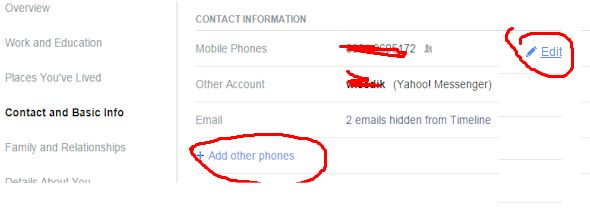
In next appearing page you have a list of option on left panel of appearing page. (A Shown in Image Below).

Click on Each option one by one and edit your profile information. For example On the Basic Information page, you can edit your current and hometown cities, languages you speak, and more.
When you select any option for example Contact and Basic Information Then you can edit any information by clicking on edit option after the information or you can add more information by clicking Add other option below the information.