Changing Password Of Computer With Out Giving Old Password
Changing Password Trick
In These Tutorials We Explain The Very Short Cut Way Of Changing The User Password Without Giving Old Password.
If You Want To Change The Password Of Your Window Then A Very Quick And Short Way
Is As Follow:
Open Command Prompt.
Write The Following Command At Command Prompt.
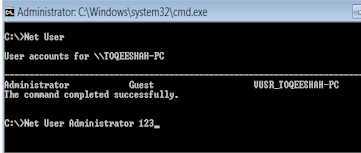
Net User
When You Write The Net User Command And Press Enter Key Then You Can See The
User Name List Of You Computer Window.
Now Type Again The Net User Command Followed By User Name And New Password And
Press Enter Key.
For Example
C:\ Net User Administrator 123
Where Administrator Is Your User Name.
And
123 Is Your New Password.
If You Like This Please Share With Your Friends On Face Book