MS Excel Tutorial PMT Function
Financial Functions PMT() In Excel
In this tutorials we are discuse the one of the most important function of MS excel the financial function. This function called and use with name of PMT( ) function.This function is used for calculation like that monthly payment amounts on a loan .
Ok we take an example if take a loan of 50000 thousand rupees from bank and this payment return in monthly installation with in 4 year ( which is 48 Month). So calculate the per month total payment.
Create table With Interest Rate , Duration of Payment in month , Total Value of loan , Monthly Due Amount, Total Payment after 4 year (48 MONTH). which is look like the following image:

So there we have required Monthly installation payment.
So we use PMT function
PMT(rate, nper, pv, fv, type)
Lets little describe the argument of PMT function.
Rate: is interest rate which include in monthly payment. in our case 2% (C6 in excel table above)
NPER: This is number of the payment in our case we have 4 year means that 12*4=48 Month
PV: this previous value . this actually value which is taken as loan . In my example is RS. 50000.
fv and type is optional so leave these two argument.
Now Put the PMT function in F6 cell of the above table which is monthly payment.
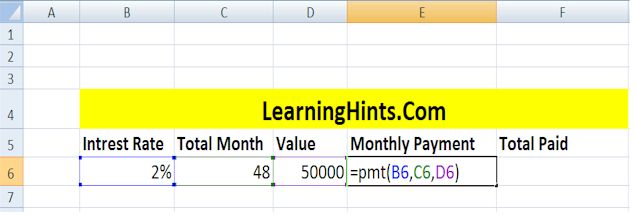
So after putting the function we have the solution : Rs 1630.09 per Month

In F6 cell we calculate the total amount which we are going to paid after 48 month ( 4 year) is
=1630.09 * 48 so we put a simple formula in F6 which is =E6*C6
PMT() Financial Functions
Calculate the Sum of a Range Using AutoSum function
User Define Function (UDF) In Excel
Macros In Excel
Relative and Absolute Cell Reference in MS Excel
Page Setting and printing In MS Excel
Fill In Excel
How we use The Functions in MS Excel
How we Write Excel Formulas
Components of Excel 2007 Environment
Rounding The Numbers MS Excel
SUMIF FUNCTION In MS EXCEL
COUNTIF Function In MS Excel
COUNTBLANK Function In MS Excel
VLOOKUP Function In MS Excel
Pivot Table In MS Excel
Consolidation In MS Excel
Remove Duplicate Value In MS Excel
Convert Excel Data in to a Table