MS Excel Tutorial AutoSum Function
Calculate the Sum of a Range Using AutoSum function In Excel
In this tutorial we learn that how w calculate the sum of any given data in shape of cell range using AutoSum function.
We take an example of the following table in excel:
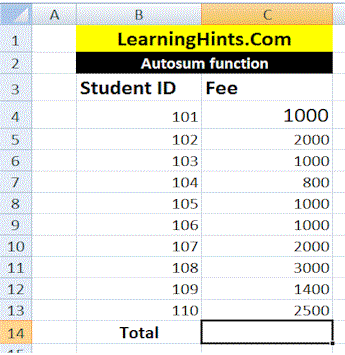
In above table we have fee detail of the students. we want to calculate the Total fee in The Cell C14.
For this purpose Click in Cell C14
Select the Formulas tab.
Select Autosum from functions library.
Select Sum.
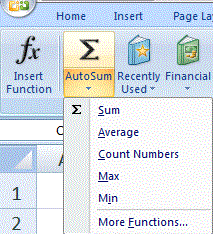
Formula will appear in the selected cellC14. AutoSum command automatically selects the range of cells from C4 to c13.

Now Press the Enter key. The total will appear as 15700.
PMT() Financial Functions
Calculate the Sum of a Range Using AutoSum function
User Define Function (UDF) In Excel
Macros In Excel
Relative and Absolute Cell Reference in MS Excel
Page Setting and printing In MS Excel
Fill In Excel
How we use The Functions in MS Excel
How we Write Excel Formulas
Components of Excel 2007 Environment
Rounding The Numbers MS Excel
SUMIF FUNCTION In MS EXCEL
COUNTIF Function In MS Excel
COUNTBLANK Function In MS Excel
VLOOKUP Function In MS Excel
Pivot Table In MS Excel
Consolidation In MS Excel
Remove Duplicate Value In MS Excel
Convert Excel Data in to a Table